
-
Introduction
-
Database Application
-
Overview of Commands
-
Layout
-
Electric
-
Evaluation
-
Data Export
-
Presentation
-
Analysis
-
===============
-
FAQ – Frequently Asked Questions
-
-
- How is the calculation of the row distance / shadow cast?
- How can I add a prototype-drawing to Helios 3D?
- What does the message “This drawing was last saved by an earlier version of one of the following products:” mean?
- How can I improve the performance of huge projects?
- Why does the Selection Dialog for Prototype Drawings not appear?
- Why are Project Numbers not Managed automatically?
-
Common Erros
-
Step-by-step Tutorials
-
Useful Hints and Tips
-
Releases
- Helios 3D Update 2026.0.3.0
- Helios 3D Update 2026.0.2.2
- Helios 3D Update 2026.0.2.1
- Helios 3D Update 2026.0.2.0
- Helios 3D Update 2026.0.1.5
- Helios 3D Update 2026.0.1.4
- Helios 3D Update 2026.0.1.3
- Helios 3D Update 2026.0.1.2
- Helios 3D Update 2026.0.1.1
- Helios 3D Update 2026.0.1.0
- Helios 3D Update 2025.0.1.4
- Helios 3D Update 2025.0.1.3
- Helios 3D Update 2025.0.1.2
- Helios 3D Update 2025.0.1.1
- Helios 3D Update 2025.0.1.0
- Helios 3D Update 2024.0.1.7
- Helios 3D Update 2024.0.1.6
- Helios 3D Update 2024.0.1.5
- Helios 3D Update 2024.0.1.4
- Helios 3D Update 2024.0.1.3
- Helios 3D Update 2024.0.1.1
- Helios 3D Update 2024.0.1.0
- View all articles ( 7 ) Collapse articles
Height Analysis

The second menu contains the height analysis. Here, you can choose from different basic color schemes to represent height variations on the surface. Additionally, you can adjust these color schemes to suit your specific needs, allowing for customized visual representation of height data.
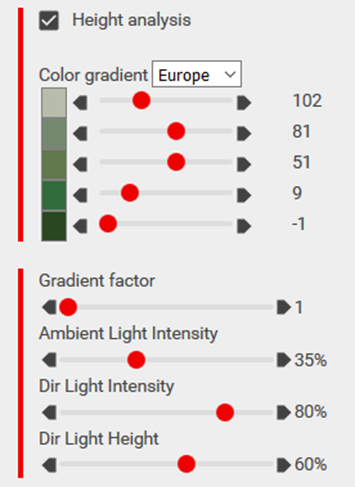
Using the gradient factor, you can scale the color scheme so that only a portion of the colors is used, improving the visual representation of the surface. Increasing the gradient factor helps prevent white tops on hills, which can appear unnatural on nearly flat surfaces.
You can further adjust the display of colors with sliders for ambient light intensity, direct light intensity, and direct light height to refine how the terrain and height analysis are visually rendered.