
Choice Lists
Abstract content that can be added as supplementary information for various records is organized in selectable choice lists. The figure below displays the default choice lists. The lists with a symbol indicate that the main folders are system-defined and cannot be modified by the user. However, users are free to create subfolders and entries.
Choice lists are part of the database structure of Helios 3D. They provide standardized selectable values that can be reused in project records, component master data, electrical definitions and other database-related dialogs. Using predefined values helps keep project data consistent, reduces manual spelling variations and improves filtering, reporting and evaluation.
Some choice list folders are predefined by the system because they are required by internal workflows or database logic. These system-defined main folders should not be renamed, removed or structurally changed unless this has been checked by support or an administrator. User-defined subfolders and entries can be added where the database structure allows it.
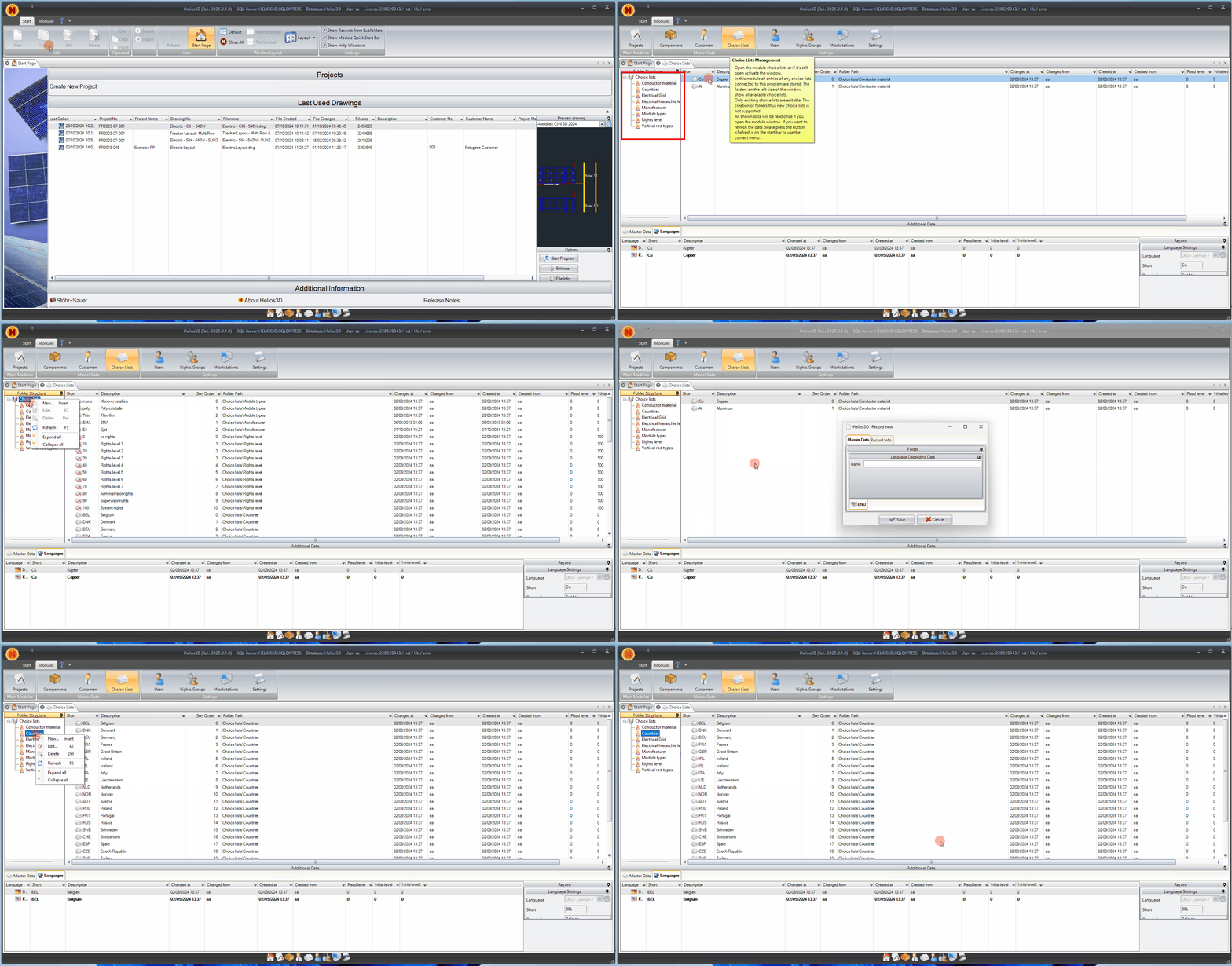
The following sections describe the most recent choice lists. Each choice list includes a unique identifier and a description available in one or more languages.
Each choice list entry should be created with a clear identifier and meaningful descriptions in the required languages. The identifier is used to distinguish the entry technically, while the language-specific descriptions are displayed to users in the interface. For multilingual environments, descriptions should be maintained consistently so that users can recognize the same entry regardless of the selected language.
Before adding new entries, check whether a suitable entry already exists. Duplicate or similarly named entries may lead to inconsistent project data, unclear reports or difficulties when filtering component and project records.
Conductor Material
This option is available for items of the type „Cable“ and includes the resistivity value required for calculating cable losses.
The conductor material should only be edited if the electrical meaning of the material and its resistivity value are known. Incorrect or inconsistent values may affect cable loss calculations and therefore influence electrical evaluation results. This is especially relevant for DC and AC cable definitions used in PV plant planning.
Countries
This field allows selection of a country for a project record.
Country entries support the structured classification of project records. They can be useful for project organization, filtering, reporting and regional project documentation. If company-specific naming conventions are used, country names should still remain clear and internationally understandable.
Electrical Grid
This section allows you to create electrical grids. These are treated as abstract objects rather than components, as they do not represent physical items.
Electrical grid entries are used to describe grid-related information without creating a physical component master record. This distinction is important because an electrical grid is part of the project and electrical context, but it is not handled like a cable, module, inverter or other physical item.
Use clear names for electrical grid entries so that planners and administrators can identify the intended grid connection or grid category when working with project and electrical data.
Electrical Hierarchy Levels
These are used internally and displayed as additional information in certain lists within the Electric tab on the Helios 3D palette.
Electrical hierarchy levels help describe the structure of electrical planning data. They may appear as additional information when working with electrical objects, device structures or lists in the Electric workflow.
Because these entries are used internally, changes should be handled with particular care. Do not rename or remove predefined entries unless the effect on the Electric tab, device hierarchy and existing projects has been checked.
Manufacturer
This field allows selection of a manufacturer for any component master record.
Manufacturer entries help standardize component master data. They are typically used when maintaining PV modules, inverters, cables, mounting system components or other technical items. Consistent manufacturer names improve searching, filtering and reporting across the component database.
Avoid creating multiple entries for the same manufacturer with different spelling, abbreviations or language variants unless this is required by an internal company standard.
Module Types
This option can be selected for components of the type „Cable.“
Module type entries classify PV module-related component data and help users distinguish different module categories in the component database. The exact use of this choice list depends on the component type and should follow the company’s component management rules.
Rights Level
This section defines the rights levels for the Helios 3D database, which are necessary for the application to access the database.
Rights levels are related to database access and user permissions. They should only be maintained by administrators or responsible database managers. Incorrect rights level settings may prevent users or workstations from accessing required database functions.
Before changing rights level entries, verify the intended permission concept and check whether existing users, workstations or database processes depend on these entries.
Vertical Rod Types
This option can be selected for components categorized as „Post.“
Vertical rod types help classify post-related components in the mounting structure context. In PV ground-mounted projects, posts and vertical structural elements are relevant for table construction, mounting definitions and component documentation.
Use consistent naming for post-related entries so that component records, mounting structure data and reports remain understandable.
Recommendations for Editing Choice Lists
Before editing choice lists, consider the following recommendations:
- Check whether the list is system-defined or user-maintainable.
- Avoid deleting or renaming entries that are already used in existing records.
- Use consistent identifiers and descriptions.
- Maintain multilingual descriptions where required.
- Test the affected workflow after changing entries that are used by electrical planning, component management or project records.
- Document company-specific entries so that other users understand their intended use.
Changing predefined choice list entries may affect database records, component selection, electrical workflows, user permissions, reports or project-related evaluations. If unexpected behavior occurs after editing a choice list, check whether a required predefined entry was renamed, deleted, duplicated or moved.
For system-defined folders and entries, changes should be tested in a controlled environment before they are applied to productive project databases.