
Exclusion Zones
Exclusion Zones define areas within a placement field where PV tables, rows or related placement objects should not be placed. They are used to reserve or protect parts of the site, for example restricted areas, shaded areas, obstacles, access zones or areas that must remain free for technical, legal or planning reasons.
During automatic placement, Exclusion Zones should be considered as blocked or restricted parts of the field. This helps prevent PV tables or rows from being placed in areas that are not suitable for installation.
Depending on the project setup, an Exclusion Zone may also influence routing decisions for automatically generated trenches. The options shown in the placement structure define whether row trenches are allowed to cross the selected Exclusion Zone or whether they must avoid it.
In Helios 3D, Exclusion Zones are part of the placement structure and are evaluated in the context of the selected field. They help control the available area for array placement and support a more realistic PV layout.Field North“. The red frame highlights the options to allow or forbid exclusion zones from being crossed by automatically generated trenches, particularly when strings are led between tables on both sides of a zone. For the „Restricted Area,“ crossing trenches are set to be forbidden.
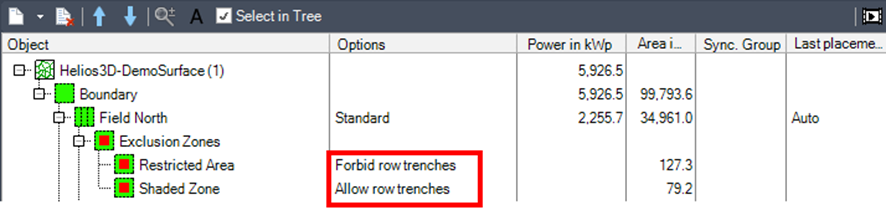
Use Forbid row trenches when cables or trenches must not pass through the Exclusion Zone. This is typically relevant for restricted areas, protected zones or areas where excavation is not allowed.
Use Allow row trenches when the Exclusion Zone blocks table placement but may still be crossed by automatically generated trenches. This can be useful when strings are routed between tables located on both sides of the zone.
Before using this option, check whether the crossing is technically and legally allowed for the project site.
Typical workflow
A typical workflow for using Exclusion Zones is:
- Prepare or select the field in which the PV layout will be created.
- Define the areas that must be excluded from placement.
- Register or assign these areas as Exclusion Zones in the placement structure.
- Check whether automatically generated row trenches may cross each Exclusion Zone.
- Run or update the array placement.
- Review the resulting table layout and trench routing.
Common checks
If the placement result does not react as expected, check the following points:
- The Exclusion Zone must be assigned to the correct field.
- The zone geometry should be closed and located inside or intersecting the relevant placement area.
- The placement should be recalculated after changing Exclusion Zones.
- The trench crossing option should match the intended routing behavior.
- The drawing objects used for the zone should be clearly identifiable and not placed on a hidden or locked layer.