
Help Center
The Helios 3D Help Center is the central knowledge base for working with Helios 3D. It provides structured access to installation guidance, database administration, project and component management, layout planning, electrical design, analysis, data export, tutorials, release notes and troubleshooting information.
Use the chapter navigation to browse the documentation by topic, or use the search field to find help articles by command name, workflow step, error message, planning topic or common user question.
Help Center structure
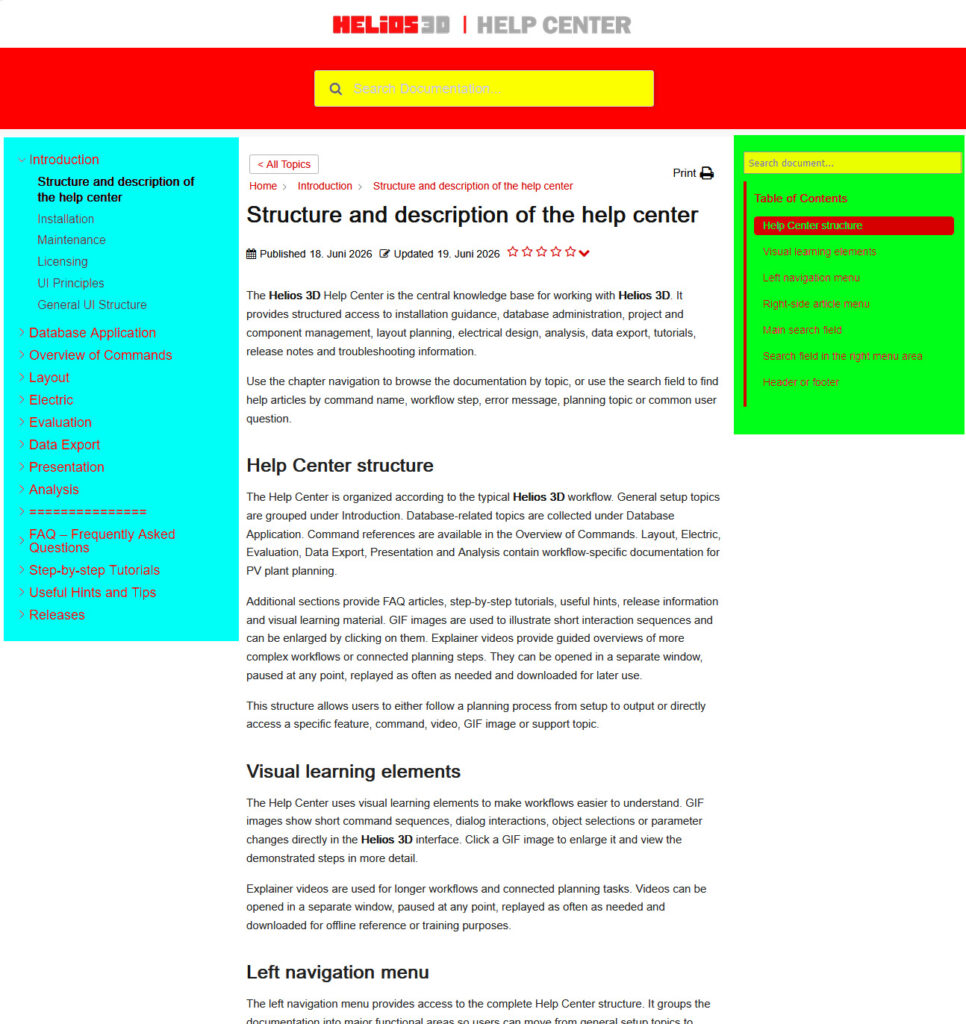
The Help Center is organized according to the typical Helios 3D workflow. General setup topics are grouped under Introduction. Database-related topics are collected under Database Application. Command references are available in the Overview of Commands. Layout, Electric, Evaluation, Data Export, Presentation and Analysis contain workflow-specific documentation for PV plant planning.
Additional sections provide FAQ articles, step-by-step tutorials, useful hints, release information and visual learning material. GIF images are used to illustrate short interaction sequences and can be enlarged by clicking on them. Explainer videos provide guided overviews of more complex workflows or connected planning steps. They can be opened in a separate window, paused at any point, replayed as often as needed and downloaded for later use.
This structure allows users to either follow a planning process from setup to output or directly access a specific feature, command, video, GIF image or support topic.
Visual learning elements
The Help Center uses visual learning elements to make workflows easier to understand. GIF images show short command sequences, dialog interactions, object selections or parameter changes directly in the Helios 3D interface. Click a GIF image to enlarge it and view the demonstrated steps in more detail.
Explainer videos are used for longer workflows and connected planning tasks. Videos can be opened in a separate window, paused at any point, replayed as often as needed and downloaded for offline reference or training purposes.
Left navigation menu
The left navigation menu provides access to the complete Help Center content. It groups the documentation into major functional areas so users can move from general setup topics to database configuration, layout design, electrical planning, analysis, output and support information.
Use the left menu when you want to browse the documentation by topic area or when you need to understand where a function belongs within the overall Helios 3D workflow. Articles in these sections may contain screenshots, clickable GIF images or explainer videos to support the written instructions.
Right-side article menu
The right-side menu helps users navigate within the currently opened article. It lists the main headings and jump points of the page so that longer help articles can be scanned quickly.
Use this menu to move directly to a specific explanation, workflow step, parameter description, warning, troubleshooting note or related section within the current article.
Main search field
Use the main search field to search across the entire Helios 3D Help Center. You can search for menu names, commands, dialog names, planning tasks, PV-specific terms, error messages or natural-language questions.
If the search does not return the expected result, try alternative terms, abbreviations, related PV planning vocabulary or visual-content terms such as “video”, “tutorial”, “GIF”, “animation”, “workflow”, “open in new window”, “pause”, “replay” or “download”.
Search field in the right menu area
Use this search field to quickly find relevant Help Center content within the current article. It is especially useful when you know the topic, command, setting or error message but are not sure in which chapter it is documented.
If the search does not return the expected result, try alternative terms, abbreviations, related PV planning vocabulary or visual-content terms such as “video”, “tutorial”, “GIF”, “animation”, “workflow”, “open in new window”, “pause”, “replay” or “download”.
When to use FAQ, tutorials or release notes
Use FAQ articles when you are looking for answers to common questions or known support cases.
Use step-by-step tutorials when you want to follow a complete workflow from start to finish.
Use release notes when you need information about changes, improvements or fixes in a specific Helios 3D version.
Header or footer
The Helios 3D Help Center provides structured documentation for PV plant planning workflows, database administration, layout design, electrical planning, analysis, export, tutorials, troubleshooting, release information, clickable GIF images and downloadable explainer videos.